在 Cadence Virtuoso 中进行 CDL 网表导出时,有时会遇到 OSSHNL-514 错误,提示 hnlCDLParamList 属性未定义。本文总结了导致该错误的两类常见原因及对应的解决方案:
si.env中simSimulator配置错误——使用了"cdl"而非"auCdl",导致调用了错误的网表器。- PDK 单元缺少
auCdl视图——网表器找不到auCdl视图后退而展开schematic,但缺少必要的属性定义。
建议按顺序排查:先检查 si.env 配置(原因一),再检查 PDK 单元视图(原因二)。
1. 错误现象 (Error Messages)
在执行 CDL 网表导出(Run netlist / CDL Out)时,日志中出现如下报错:
1
2
3
4
5
6
7
8
9
10
11
12
13
Begin Incremental Netlisting
Failed to netlist because the hnlCDLParamList property for hierarchical cellview 'resm1' is not defined.
Either define the hnlCDLParamList property for the cellview or assign the CDLBlackBox property to the cellview and renetlist.

Failed to find 'hnlCDLFormatInst' property for element 'resm1' for current instance resm1 in cellview db:0x059eb39a.
Ensure that it is either a black box or it has nlAction property with value = "stop".

ERROR (OSSHNL-514): Netlist generation failed because of the errors reported above.
The netlist might not have been generated at all, or the generated netlist could be corrupt.
Fix the reported errors and regenerate the netlist.

CDL netlist did not complete.
ERROR: Problem creating CDL for Module_1/1_3_Exclude_Self_Capacitance/schematic
2. 原因一:si.env 中 simSimulator 配置错误(优先排查)
在调试过程中发现,同一套设计在 CIW 手动导出 CDL 成功,而在 PVS LVS 中导出 CDL 却失败并报 OSSHNL-514 错误。对比两种方式各自使用的 si.env 文件,找到了关键差异:
| 场景 | simSimulator 值 |
结果 |
|---|---|---|
| CIW 手动导出 CDL | "auCdl" |
✅ 成功 |
| PVS LVS 自动调用 | "cdl" |
❌ 失败(OSSHNL-514) |
根本原因:simSimulator = "cdl" 使用的是传统 CDL 网表器,它对层次化单元的 hnlCDLParamList、hnlCDLFormatInst 等属性有严格要求;而 simSimulator = "auCdl" 使用的是 Virtuoso 的 AMS/auCdl 网表器,能正确处理 simStopList 机制并自动停止递归。
解决方法:在 PVS LVS 流程所使用的 si.env 文件中,将:
1
simSimulator = "cdl"
改为:
1
simSimulator = "auCdl"
保存后重新运行 PVS LVS,CDL 网表导出即可恢复正常。
提示:
si.env通常位于运行目录(run directory)下,或由 PVS/LVS 工具配置指定其路径。若有多个si.env模板,需确认 LVS 流程实际加载的是哪一个再进行修改。
PVS LVS GUI 配置方式
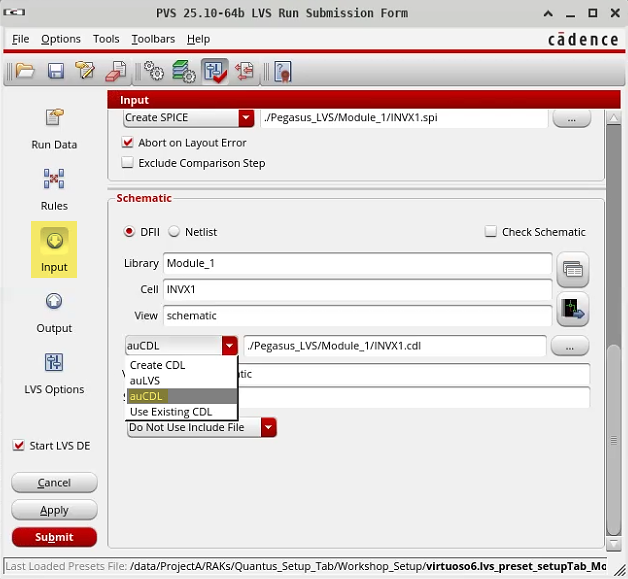
3. 原因二:PDK 单元缺少 auCdl 视图
3.1 触发场景:PVS LVS 中的 CDL 网表生成
本文的典型场景是在运行 PVS LVS 时,工具内部调用 si -batch 生成 schematic CDL 网表,命令参数中包含:
1
2
-simViewList auCdl schematic
-simStopList auCdl
这两个参数是问题的核心:
| 参数 | 含义 |
|---|---|
simViewList auCdl schematic |
网表器查找视图的优先顺序:先找 auCdl 视图,没有则找 schematic |
simStopList auCdl |
遇到有 auCdl 视图的单元时停止递归,将其作为叶节点处理 |
3.2 根本原因
resm1、resm2、resm6 这些金属电阻在 GPDK045 中没有 auCdl 视图。
网表器的处理逻辑如下:
1
2
3
4
5
6
7
8
遍历 Module_1/1_3_Exclude_Self_Capacitance/schematic
  └─ 遇到实例 resm1
       ├─ 查找 gpdk045/resm1/auCdl  → 不存在
       ├─ 查找 gpdk045/resm1/schematic → 存在!
       │    └─ 尝试展开 schematic 层次
       │         └─ 需要 hnlCDLParamList 属性 → 未定义
       │              └─ ERROR: OSSHNL-514
       └─ (resm2、resm6 同理)
因此,真正的原因是 auCdl 视图缺失,导致网表器退而展开 schematic,但 schematic 又缺少 hnlCDLParamList 属性,最终报错。
3.3 关键属性说明
hnlCDLParamList:网表器需要知道该层次化单元应将哪些参数写入.subckt定义行。hnlCDLFormatInst:网表器需要一个 SKILL 过程来格式化该单元的实例调用行。nlAction:指示网表器在遇到该单元时停止向下递归(值为"stop")。CDLBlackBox:标记单元为黑盒,跳过内部展开。
4. 原因二的解决方案 (Solutions)
针对原因二(PDK 单元缺少 auCdl 视图),有三种解决方案,推荐优先考虑方案 A(创建 auCdl 视图):
方案 A:为 PDK 单元创建 auCdl 视图(从根本解决)
为 resm1 等单元补充 auCdl 视图,网表器即可在 simStopList 机制下正常停止递归,而无需修改 schematic 视图的属性。
操作步骤:
- 在 Library Manager 中找到
gpdk045→resm1。 - 右键 → New View,View Name 填
auCdl,View Type 选schematic(或复制symbol视图改名)。 - 编辑该单元的 Base CDF(Tools → CDF → Edit):
- 在
auCdl的simInfo部分配置termOrder(端口顺序)和nilProc(格式化过程)。
- 在
- 保存后对
resm2、resm6重复操作。 - 重新运行 LVS / CDL 导出。
说明:此方案不改动 schematic 视图,对 PDK 原始数据侵入最小,且符合 Cadence 推荐的
auCdl网表流程。若 PDK 库只读,需先将单元 copy 到可写库再操作。
方案 B:在 schematic 视图添加 nlAction 和 hnlCDLParamList 属性
此方案直接在 schematic cellview 上添加属性,告知网表器停止递归并指定输出参数。适用于无法或不便创建 auCdl 视图的情况。
SKILL 命令(在 CIW 中执行):
; 以 resm1 为例,对 resm2、resm6 重复相同操作
let((cv)
  cv = dbOpenCellViewByType("gpdk045" "resm1" "schematic" "" "a")
  when(cv
    ; 定义需要在网表中输出的参数列表,根据实际 CDF 参数调整
    dbReplaceProp(cv "hnlCDLParamList" "list" '("w" "l"))
    ; 告知网表器在此单元处停止递归
    dbReplaceProp(cv "nlAction" "string" "stop")
    dbSave(cv)
    dbClose(cv)
    printf("resm1 schematic updated successfully.\n")
  )
)
注意:
hnlCDLParamList的参数列表需与该单元的 CDF 参数对应,例如电阻的宽度w、长度l。请根据实际 PDK 文档确认参数名称。
UI 操作步骤:
- 在 Library Manager 中找到
gpdk045→resm1→schematic,双击打开。 - 菜单选择 Edit → Properties → Cellview。
- 在 Properties 面板中点击 Add:
- 添加属性
hnlCDLParamList,类型选list,值填写参数列表(如("w" "l"))。 - 添加属性
nlAction,类型选string,值填写stop。
- 添加属性
- 点击 OK 并保存,对
resm2、resm6重复上述步骤。 - 重新运行 CDL 网表导出。
方案 C:设置 CDLBlackBox 属性(黑盒处理,最简单)
此方案将单元标记为黑盒,网表器不会展开其内部层次,仅生成一个空的 .subckt 定义(或跳过定义)。适用于不需要在 CDL 中展开内部细节的情况。
SKILL 命令(在 CIW 中执行):
; 以 resm1 为例
let((cv)
  cv = dbOpenCellViewByType("gpdk045" "resm1" "schematic" "" "a")
  when(cv
    dbReplaceProp(cv "CDLBlackBox" "boolean" t)
    dbSave(cv)
    dbClose(cv)
    printf("resm1 set as CDL black box.\n")
  )
)
UI 操作步骤:
- 打开
resm1的 schematic 视图。 - 菜单选择 Edit → Properties → Cellview。
- 添加布尔属性
CDLBlackBox,值设为t(true)。 - 保存后重新运行 CDL 导出。
方案对比
| 对比项 | 方案 A(创建 auCdl 视图) | 方案 B(nlAction = stop) | 方案 C(CDLBlackBox) |
|---|---|---|---|
| 修改范围 | 创建新视图 + CDF | 修改 schematic 属性 | 修改 schematic 属性 |
| 参数输出 | 由 CDF simInfo 控制 | 在 .subckt 行输出指定参数 |
不输出参数(黑盒) |
| 内部展开 | 停止(符合 simStopList) | 不展开,停止递归 | 不展开 |
| 与 simStopList 协作 | ✅ 原生支持 | ✅ 兼容 | ✅ 兼容 |
| 适用场景 | 标准 PDK 单元补全 | 需保留参数但不建 auCdl | 仅需占位 |
5. 批量处理多个单元(SKILL 脚本)
如果有多个单元需要修复,可使用以下批处理脚本:
; 批量为 gpdk045 中的金属电阻单元设置 nlAction 和 hnlCDLParamList
let((cellList cv libName)
  libName = "gpdk045"
  cellList = '("resm1" "resm2" "resm6")
  foreach(cellName cellList
    cv = dbOpenCellViewByType(libName cellName "schematic" "" "a")
    if(cv then
      dbReplaceProp(cv "hnlCDLParamList" "list" '("w" "l"))
      dbReplaceProp(cv "nlAction" "string" "stop")
      dbSave(cv)
      dbClose(cv)
      printf("Updated: %s/%s/schematic\n" libName cellName)
    else
      printf("WARNING: Cannot open %s/%s/schematic\n" libName cellName)
    )
  )
)
执行完毕后重新运行 CDL 网表导出。
6. 排查步骤(Troubleshooting Checklist)
- 检查
si.env中simSimulator配置:确认值为"auCdl"而非"cdl"。若配置错误,修改后重新运行即可(见第 2 节)。 - 确认报错单元名称:从错误日志中收集所有报错的单元(
resm1、resm2、resm6等)。 - 确认单元所在库:通过 Library Manager 搜索,或在 CIW 执行:
foreach(lib ddGetObj("") when(ddGetObj(lib~>name "resm1") printf("%s\n" lib~>name))) - 检查是否有
auCdl视图:在 Library Manager 中查看该单元是否已有auCdlview,没有则优先考虑方案 A。 - 检查 PDK 库写权限:若 PDK 库只读,需先将相关单元 copy 到本地可写库(Library Manager → Copy),再进行修改。
- 选择并执行方案:根据实际情况选择方案 A / B / C。
- 重新运行 LVS / CDL 导出:确认错误消除。
- 校验网表内容:检查生成的
.cdl文件,确认.subckt定义及参数输出符合预期。
7. 参考资料 (References)
- How to get parameters on the .subckt definition line while doing CDLOut —— 说明
hnlCDLParamList使用方法(需登录) - Example of using CDL (Digital) Netlister to do blackbox netlisting ——
CDLBlackBox黑盒用法示例(需登录) - CDL Out Task Assistant – How to Create a Black Box? —— CDL Task Assistant 黑盒创建指引(需登录)
- Cadence Virtuoso Analog Design Environment User Guide —— CDL Out 章节